Google has introduced a new generative UI implementation that empowers AI models to build fully interactive, immersive experiences, tools, and simulations generated entirely on demand from any prompt. This innovative feature is now rolling out in the Gemini app and Google Search, beginning with AI Mode.
Generative UI is a powerful capability where an AI model constructs an entire user experience, not just content. Google recently introduced a novel implementation of this technology that dynamically creates fully customized, immersive visual experiences and interactive interfaces, such as tools, web pages, games, or applications, in response to any prompt, from a single word to detailed instructions. This represents a significant departure from the static, predefined interfaces typically used to render AI-generated content.
Google's evaluations demonstrate a strong human preference for interfaces generated by our new Generative UI implementation compared to standard LLM outputs (even when ignoring generation speed). This work is the crucial first step toward fully AI-generated user experiences, where dynamic interfaces are automatically tailored to user needs, eliminating the necessity of selecting from a fixed catalog of applications. This research on Generative UI (also known as generative interfaces) is launching today as an experiment called Dynamic View in the Gemini app and as AI Mode in Google Search.
Generative UI in Google products
Generative UI capabilities are launching in the Gemini app as two experiments: Dynamic View and Visual Layout. Dynamic View, which utilizes our generative UI implementation, leverages Gemini's agentic coding capabilities to design and code a fully customized, interactive response for every prompt. This customization is highly contextual; for instance, explaining the microbiome to a 5-year-old requires different content and features than explaining it to an adult, just as creating a social media post gallery needs a completely different interface than generating a travel plan.
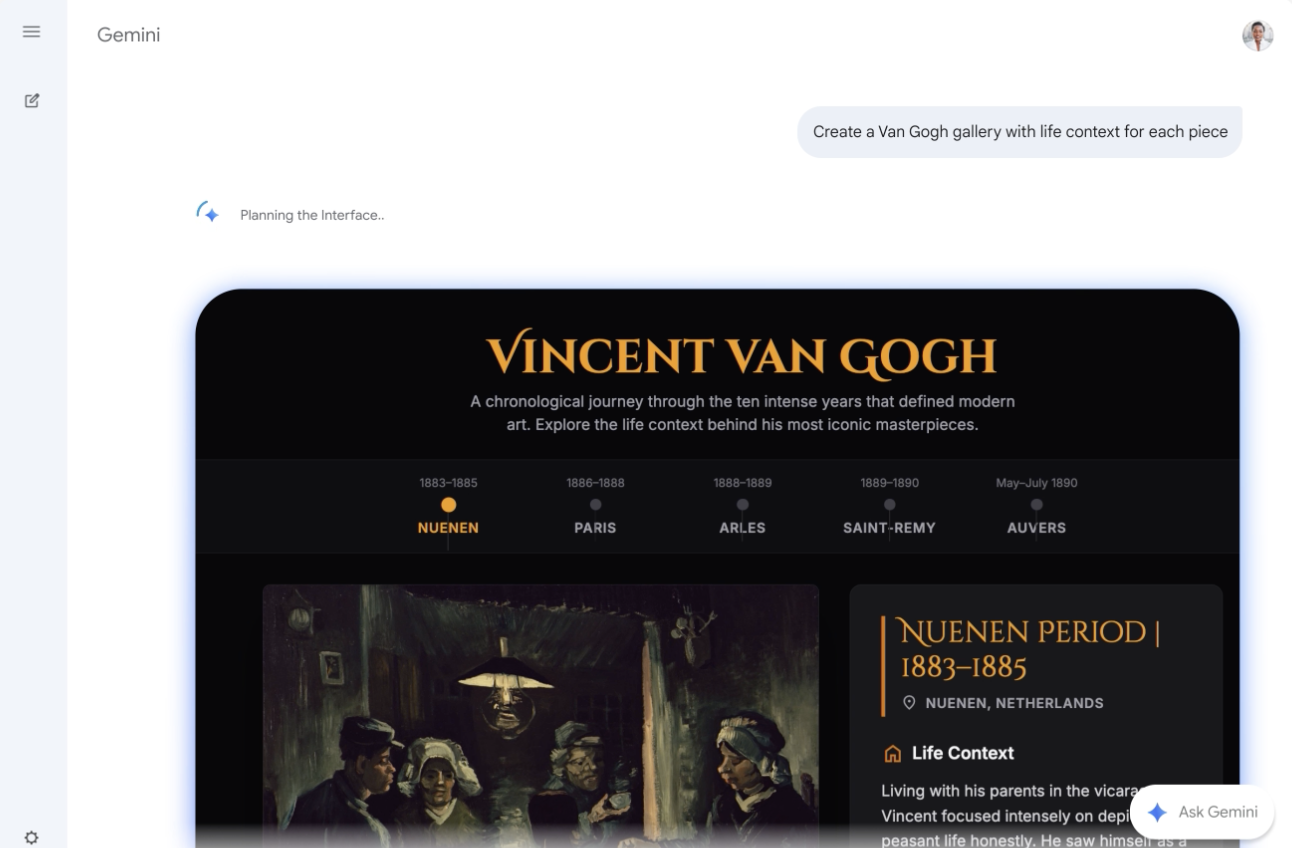
Dynamic View offers a wide range of interactive applications, from educational scenarios like learning about probability to practical tasks such as event planning and receiving fashion advice. Its interfaces are designed to allow users to learn, play, or explore interactively. Both Dynamic View and Visual Layout are rolling out today, though users may initially see only one experiment as we gather learning data.
Generative UI experiences are now also integrated into Google Search, starting with AI Mode, where they unlock dynamic visual experiences with interactive tools and simulations tailored specifically to the user's question. Leveraging Gemini 3's unparalleled multimodal understanding and powerful agentic coding capabilities, AI Mode can interpret the intent behind any prompt to instantly build bespoke generative user interfaces. By generating these interactive tools and simulations on the fly, it creates a dynamic environment optimized for deep comprehension and task completion. Generative UI capabilities in AI Mode are available today for Google AI Pro and Ultra subscribers in the U.S. To try it, simply select "Thinking" from the model drop-down menu in AI Mode.
How the generative UI implementation works
- Tool Access: A server provides the model with access to key resources, such as image generation and web search, allowing results to either enhance the model's output quality or be sent directly to the user's browser for improved efficiency.
- Carefully Crafted System Instructions: The system is guided by detailed instructions—encompassing goals, planning, examples, and technical specifications (including formatting, tool manuals, and error avoidance tips)—to ensure consistent output.
- Post-processing: The model's outputs are run through a set of post-processors designed to identify and correct potential common issues before delivery to the user.
Where product consistency is needed, our implementation allows configuration so that all generated results and assets are created in a uniform style across all users. Absent these specific instructions, the Generative UI either automatically selects a style or allows the user to influence the design via their prompt, similar to the capability in the Gemini app's Dynamic View.
Generative UI outputs are strongly preferred over standard formats
For consistent benchmarking of Generative UI, Google created PAGEN, a dataset of human expert-designed websites that will soon be released to researchers. To gauge user preference, pitted a new generative UI experience against several formats: a website created by human experts for the exact prompt, the top Google Search result, and standard LLM outputs delivered as raw text or standard markdown.
While sites designed by human experts received the highest preference rates, generative UI implementation followed closely behind, demonstrating a substantial preference advantage over all other output methods. Google also found that Generative UI performance is highly dependent on the underlying model's capabilities, with the newest models yielding substantially better results.